StreetKiosk
For food trucks and trailers

Self-order kiosks, window order kiosks and kitchen screens, one flat price per truck.

Customers order and pay on a tablet, the kitchen sees it on a screen, and you keep every dollar of your sales.* Your window staff use the same kiosk to ring up walk-up orders. Works with Square Terminal and the tablets you already have.

No card needed for the trial. Set up in an afternoon. See pricing

No cut of your sales No feature tiers Cancel any time Export your data

* Square's standard card processing fees still apply, paid to Square at your usual rates. StreetKiosk never adds a percentage on top.

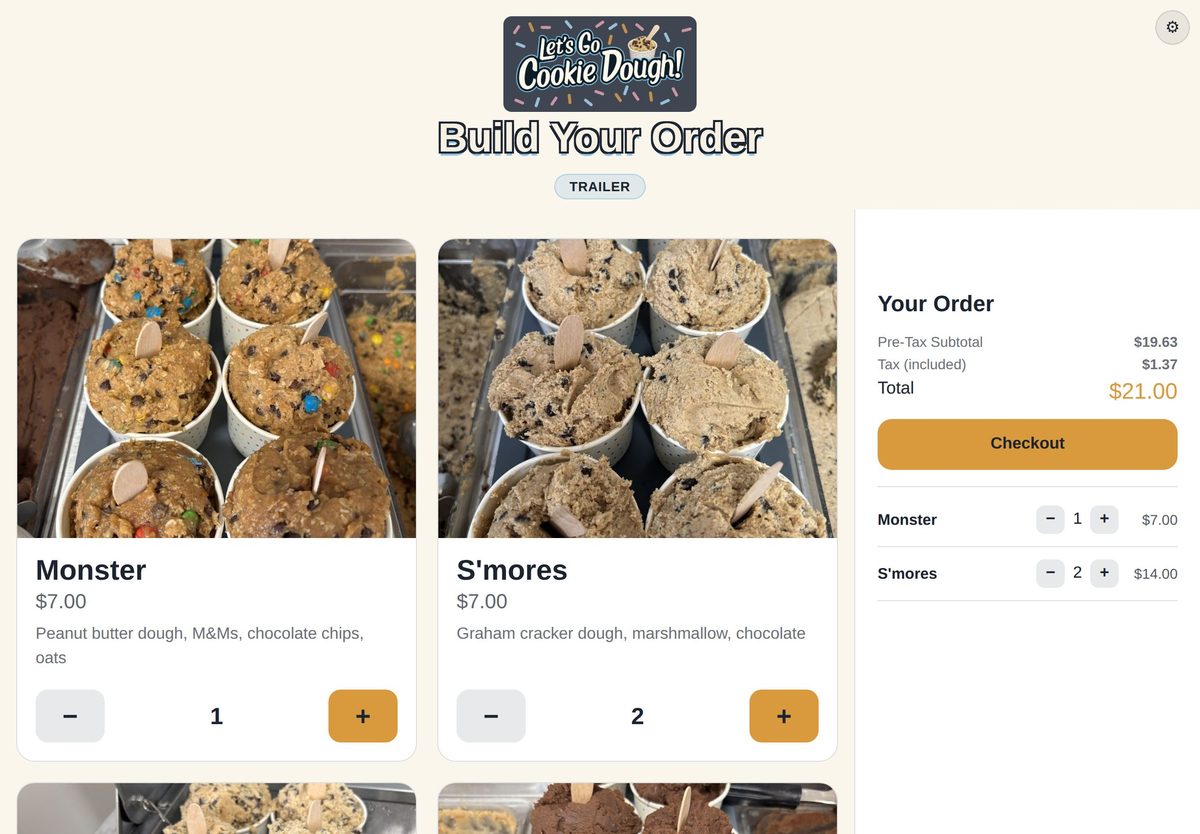
The StreetKiosk kiosk on Let's Go Cookie Dough's trailer: menu with photos and the order total
The kiosk on our trailer, with our real menu.
Meet StreetKioskQuick intro, 2 min
Our storyThe full version, 4½ min
How it works

From the line to the window, without shouting orders.

No buzzers to hand out and chase back, and no paper tickets to lose. Every order carries the customer's name from the kiosk to the kitchen screen and the window.

They order

Customers tap through your menu on a tablet kiosk, with photos, add-ons and "leave off" choices.

They pay

Card on your Square Terminal, with tips: the order reaches the kitchen once the card goes through. Paying cash? It goes straight to the kitchen marked cash due, and they pay at the window.

You make it

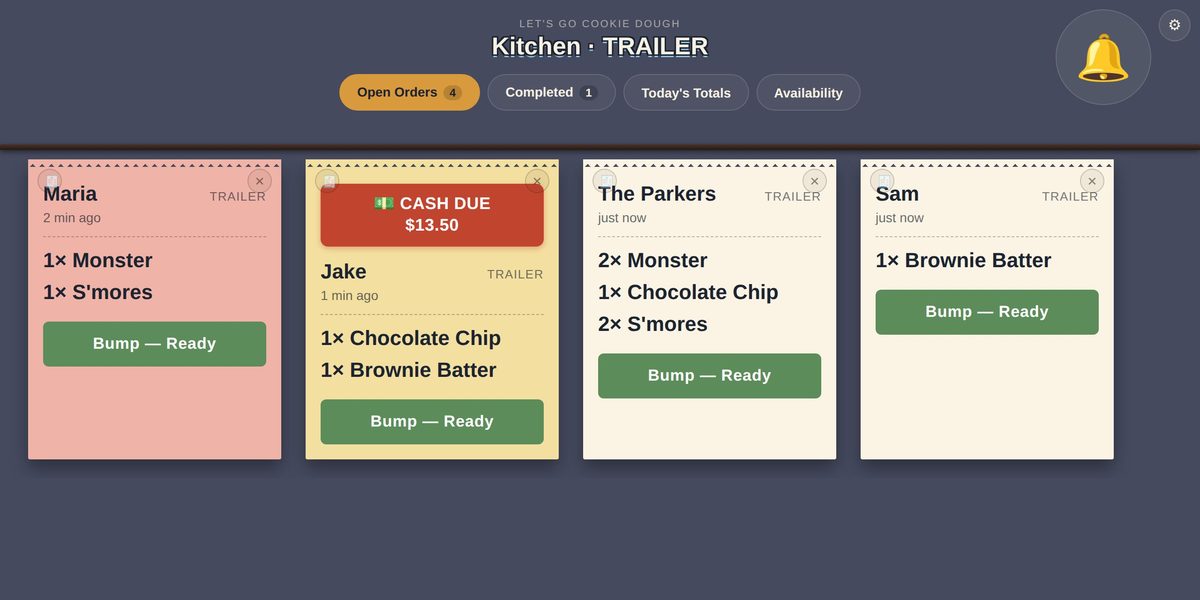
The order pops up on the kitchen screen with a chime. Split it across stations if you have them.

They pick up

Bump it when it's ready. Cash customer needs a receipt? Text it from the kitchen or Expo screen.

See it

The real thing, from our own trucks.

These are the actual screens Let's Go Cookie Dough runs every service (shown here with sample orders). Your own menu, photos and logo take their place.

Try every feature yourself in the live demo →

Inside our van: the make-table screen and Expo at the window.
An order at the window, from the kiosk to the kitchen screen.
Everything included

One plan. Every feature. Every truck.

No tiers and no add-ons to unlock: every truck gets all of it, at one fair price.

📱

Self-order kiosk

Your menu with photos, sized for a tablet on the counter. Add-ons, required choices and "no onions" built in.

🤳

Order from your phone

Customers scan a code at the truck, order on their own phone and pay with Apple Pay, Google Pay or a card. It reaches the kitchen once it's paid, and they get a text when it's ready.

🍳

Kitchen screens

Big, clear tickets with wait times. Give each station its own screen and let Expo see the whole order.

🚫

Sold out in one tap

Mark an item or an add-on sold out from the kitchen and the kiosk stops selling it straight away.

💳

Square Terminal

Connect your Square account and pair your Terminal from the admin page. Payments go straight to your Square account.

📈

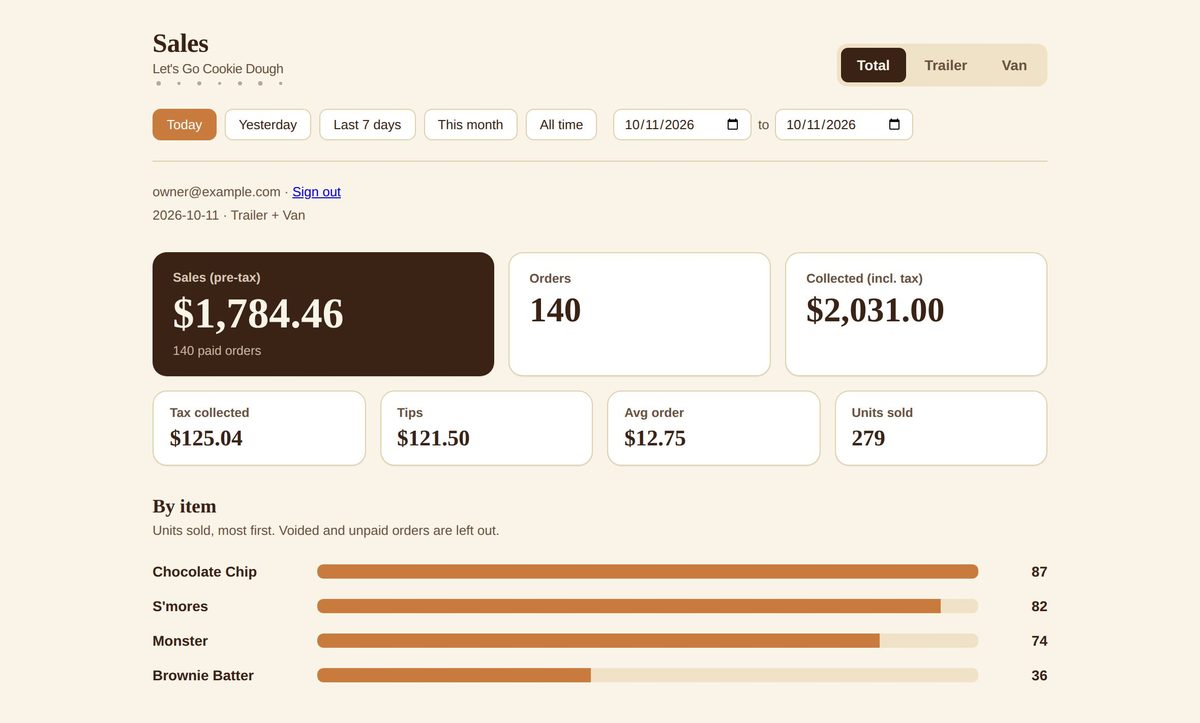
Sales dashboard

Sales, orders, tax, tips and your best sellers, by truck and for any dates, from your phone or laptop.

📒

Nightly bookkeeping email

Each night, a journal entry ready for QuickBooks, checked against Square's own totals.

💬

Text receipts

Cash customer needs a receipt? Text it to their phone from the kitchen screen. No receipt printer at the window.

📶

Built for spotty signal

If the truck's internet drops, the kiosk sends people to the window instead of taking orders the kitchen can't see.

❄️

Off-season sleep

Park a truck for the winter for $10 a month. Your menu, tablets and history wait for spring.

See it on the kitchen screen

Sold out, and back in stock, in a tap.
Change a price or the sales tax for one truck, on the spot.
Today's totals and sales by the hour.
Bumped too soon? Bring the order back.
Screens, not printers

Why kitchens switch from ticket printers.

A kitchen screen does what a printer does, without the paper, the noise and the jams.

  • Nothing to run out of mid-rushNo paper rolls or ribbons to buy, carry or change.
  • A quieter kitchenNo printer chatter or cutter. A soft chime when a new order comes in.
  • Easy to read in a hot kitchenBig tickets that don't curl, smudge or fall behind the fryer. "NO TOMATO" in capitals, options under their item.
  • Know what's waitingEach ticket shows how long it's been waiting. Bump it when it's done. A pile of paper can't tell you that.
  • Stations that stay in syncEach station sees only its own items. Expo sees the whole order come together.
  • Use a tablet you already ownAny recent tablet with a web browser. No special hardware.
Our story

Made for food truck owners, by a food truck owner.

StreetKiosk started at Let's Go Cookie Dough, our cookie dough van and trailer. We wanted self-order kiosks and kitchen screens without handing over a cut of every sale or paying more for each feature, so we built our own.

Both of our trucks take every order on it, every service. Every update is tested on our test system before it reaches a live truck. We don't like surprises in the middle of a service, and we work hard to make sure you never get one either.

Andrew, owner of Let's Go Cookie Dough and StreetKiosk

Why I built it, in my own words: watch Our story (4½ min) · Andrew on LinkedIn

Support

Help that's there when you're open.

Food trucks work evenings and weekends, so our help does too.

AI help, any hour

Ask a question and get an answer right away from an AI assistant that knows StreetKiosk inside out: setup, menus, tablets, Square, billing. Signed in to your admin page, it can look over your own setup (tablets, menu, today's orders) to spot what's wrong and walk you through the fix.

A person when it matters

Anything the assistant can't sort out goes to us, people who run a food truck. Tap Email a person in the Help chat, or send us a message.

How we keep the price flat

We build and support StreetKiosk with the help of AI. That's how one flat price per truck covers everything, with no support tiers.

Pricing

One flat price per truck. No cut of your sales.

Start with a 30-day free trial, no card needed. Every feature is included.

Trucks that sleep part of the year usually suit monthly. Details in the FAQ.

Every account starts here

First truck

$79 / month
Or $828 a year, $120 less.

Unlimited kiosks, kitchen screens, menu items and orders for the truck.

Each additional truck

$49 / month
Or $528 a year, $60 less.

Same menu across your trucks, with its own prices, stock and tax per truck.

Truck asleep for the season

$10 / month
Wake it up whenever you're back.

Keeps the truck's menu, tablets and history ready while it's parked.

Unlimited orders, items and tablets
Kiosk, kitchen screens, stations and Expo
Sales dashboard and nightly bookkeeping email
250 text receipts a month per truck, then 3¢ each, billed monthly (we doubt you'll go over)
Owner, manager and bookkeeper logins
Cancel any time; download your orders and menu

What the flat price saves you. Square's own kitchen screens cost $30 a screen each month on Square Plus, which is $49 a month itself: two screens is $109 a month, before any self-order kiosk. A system that adds even 1% on top of card fees takes $100 from a $10,000 month. StreetKiosk is one flat $79 for the truck, kiosks and screens included, and Square's standard fees stay at your usual rates.

Square prices from Square's pricing page, November 2026. Compare: StreetKiosk vs Square KDS · StreetKiosk vs Toast · StreetKiosk vs Goodfynd

Card payments go through your own Square account at your usual Square rates. StreetKiosk never takes a percentage.

Built for trucks and trailers. If you run a sit-down restaurant, a restaurant POS fits you better. Your menu and order data live in your account and are never sold; export everything at any time.

What you need

Bring a tablet and a Square Terminal.

To get started

  • A Square account (free to open) and a Square Terminal for card payments. Cash works without one.
  • A tablet for the kiosk and one for the kitchen. Any recent iPad or Android tablet with a web browser.
  • Internet on the truck: your truck's Wi-Fi or a phone hotspot.

Suggested equipment: the tablets, Terminals, mounts and internet we use on our own trucks. Tablet setup guide: lock a tablet to the kiosk and keep its screen on.

On the way

Coming next

  • Kitchen ticket printers, for kitchens that still want paper.
  • Other Square card readers: Reader, Square Stand and Square Kiosk.
  • Combos and meal deals, and menus that change on a schedule (lunch, dinner, events).
  • The kiosk in more languages.

Already shipped: see what's new, with dates. Want one of these sooner? Tell us and we'll let you know when it's ready.

Questions

Good to know

Do you take a percentage of my sales?

No. You pay one flat price per truck and that's it. Card payments go through your own Square account at your usual Square rates.

What happens when the truck's internet drops?

The kiosk notices quickly and asks customers to order at the window, so nobody pays for an order the kitchen can't see. It goes back to normal by itself when the connection returns. Card payments through StreetKiosk need the connection too, so until it's back, take cash at the window.

Are text receipts included?

Yes. Card customers can get a receipt from Square right on the Terminal (you choose whether it asks), and those are Square's and don't count. For cash customers, or anyone who decides later that they need one, send a text from the Text Receipt button on the kitchen screen: 250 a month for each truck, shared across your trucks. We email you at 75%. Past that, texts keep working at 3¢ each, added to your next monthly bill.

Can customers order from their phones?

Yes. Turn on phone ordering for a truck in the admin page and print the sign it makes: customers scan the code, order from your menu on their own phone and pay with Apple Pay, Google Pay or a card through your Square account. The order reaches the kitchen screen once it's paid, marked as a phone order, and they can get a text when it's ready. It's only open while that truck's kitchen screen is on, and staff can pause it when the kitchen is busy. Square charges its online card rate for these payments; we add nothing.

Can I use the tablets I already have?

Yes, if they're iPads or Android tablets. The kiosk and kitchen screen run in the tablet's web browser (Safari or Chrome), so any recent iPad or Android tablet works. Screens that came with another system, like Toast or Clover, are usually locked to that company's own software and have no regular web browser, so they generally won't work (how StreetKiosk compares to Toast). Each tablet is paired with a one-time code from your admin page. See Suggested equipment for what we use.

What do I need for card payments?

A Square account and a Square Terminal: Square's handheld card machine with its own screen and receipt printer. Square Reader, Square Stand, Square Register and Square Kiosk don't work with StreetKiosk yet. You connect Square from the admin page and pair the Terminal there too.

How is this different from Square's own kitchen screens?

Square KDS is $30 a screen each month on Square Plus ($49 a month) or $20 a screen on Premium ($149 a month), and it's kitchen screens only. StreetKiosk is $79 a truck with the self-order kiosk and as many kitchen screens as you like, and you can stay on Square's free plan. See StreetKiosk vs Square KDS.

I have more than one truck. How does that work?

Your first truck is $79 a month and each additional truck is $49. You keep one menu and set prices, sold-out items and sales tax per truck. The dashboard shows each truck and the total.

We close for the winter. Do I keep paying full price?

No. Put a truck to sleep and it keeps working until the end of the month you've paid for, then it's $10 a month until you wake it up. Its kiosks show that you're closed for the season, and everything is kept. Waking it is charged at the full price from that day. If your trucks sleep part of the year, the monthly plan suits you best: on a yearly plan, sleep starts at your yearly renewal.

What happens after the free trial?

Add a card any time during the 30 days and billing starts when the trial ends. If you don't, ordering pauses until you do. Nothing is deleted.

Can I cancel? Do I keep my data?

Cancel any time from the billing page. You can still sign in afterwards to download your orders and menu as spreadsheet files.

Is StreetKiosk right for a restaurant?

It's built for trucks and trailers: order at a counter or window, pick up at the window. If you run a sit-down restaurant with table service, a restaurant POS fits you better.

What happens to my data?

Your menu and order data live in your account and are never sold. We don't take card details (Square does) and the site has no ad trackers. Export your orders and menu at any time, even after you cancel. The details are in our Privacy Policy.

How do I get help?

For general questions about StreetKiosk, tap 💬 Help in the corner for an instant answer from the AI assistant, any time. For help with your own trucks and setup, use 💬 Help on your admin page: there it can see your account and answer for your trucks. For a person, tap Email a person there, or send us a message, and we'll reply as soon as possible.

Try it on your truck for 30 days.

Set up your menu, pair a tablet and take your first order this afternoon.

No card needed for the trial.

Built for trucks and trailers. Your menu and order data are never sold, and you can export everything at any time.

Questions? Send us a message

Ask us anything about StreetKiosk. We reply as soon as possible.